Online teaching platform for private tutors A school of one, with your name on the door.
You teach the lesson. EdTechCore keeps everything around it: the homework, the marking, the timetable and what each student owes.
30 days free, no card. Leave your name and email, and you go straight into your own workspace; the login details come by email too.

A ready course
An English course at B1, already in your workspace.
“Англійська B1: граматика в реальному житті” (English B1: grammar in real life), written in Ukrainian for students who speak it: 10 modules and 110 lessons - words with pictures and audio, a comic, the rule, practice, a test at the end of each module and homework. It arrives in Courses on its own, about a minute after you register, and when you run a school too.
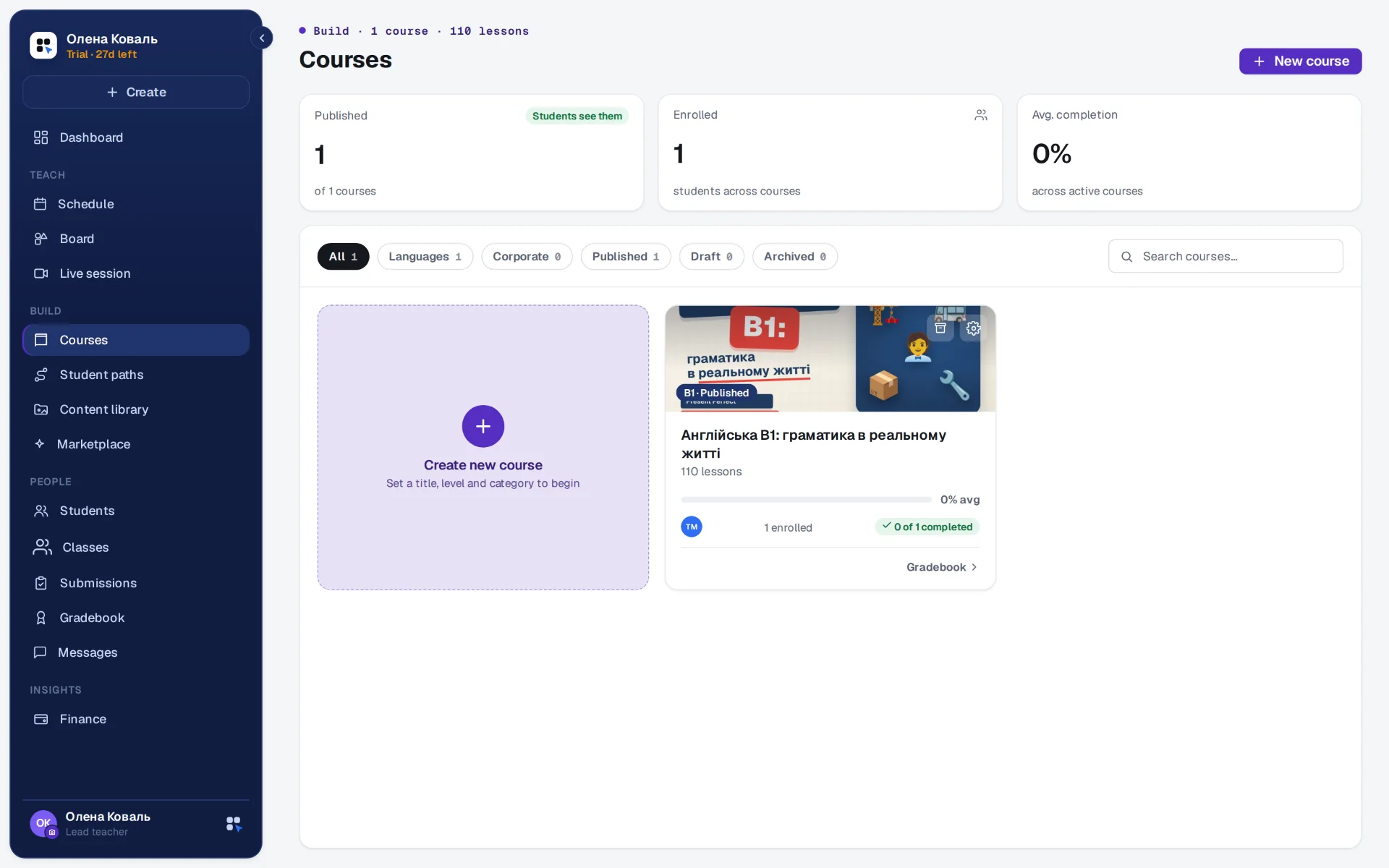
- Of its 619 marked tasks, 594 are checked automatically: Multiple choice, Word bank, Type the word, Masked word, Reading, Dictation, Find in text, Match pairs, True / false, Categorize, Put in order and Listening. Writing and speaking are yours to mark.
- Its lessons run on the board as they are, and any of them goes out as homework with “Assign as homework” beside the lesson.
- The course is yours: it stays in your workspace after the 30 days and you can change any task in it. Without a plan the workspace turns read-only - the course, the students and their answers stay - until a plan is chosen.
In the lesson
The class follows your screen.
Open a task and it opens for every student. You set the pace, see who has it right and show the answer when the class is ready.
One task on every screen
The task you open is the one your students see, on a laptop or a phone. When you move on, they move with you.
Answers when you say
Each student answers on their own screen. You see who got it right, then open the key for everyone at once.
Draw over the task
Underline, circle and point while you explain, and pin a short note for the class. The drawing lasts for the lesson and never touches your material.
Texts read aloud
A reading text can be played aloud in English, Polish or Ukrainian, with each sentence lit up as it is spoken.
Questions without interrupting
A student can ask about the task in front of them. The question arrives in the class chat with the task attached, and the chat button counts what is new.
Answers stay private
No student sees a classmate's answer. Who answered what is for your eyes only.
After the lesson
Homework in one window, marking in one queue.
Hand out the next piece of work before the call ends. Closed tasks come back marked, and only the writing and speaking wait for you.
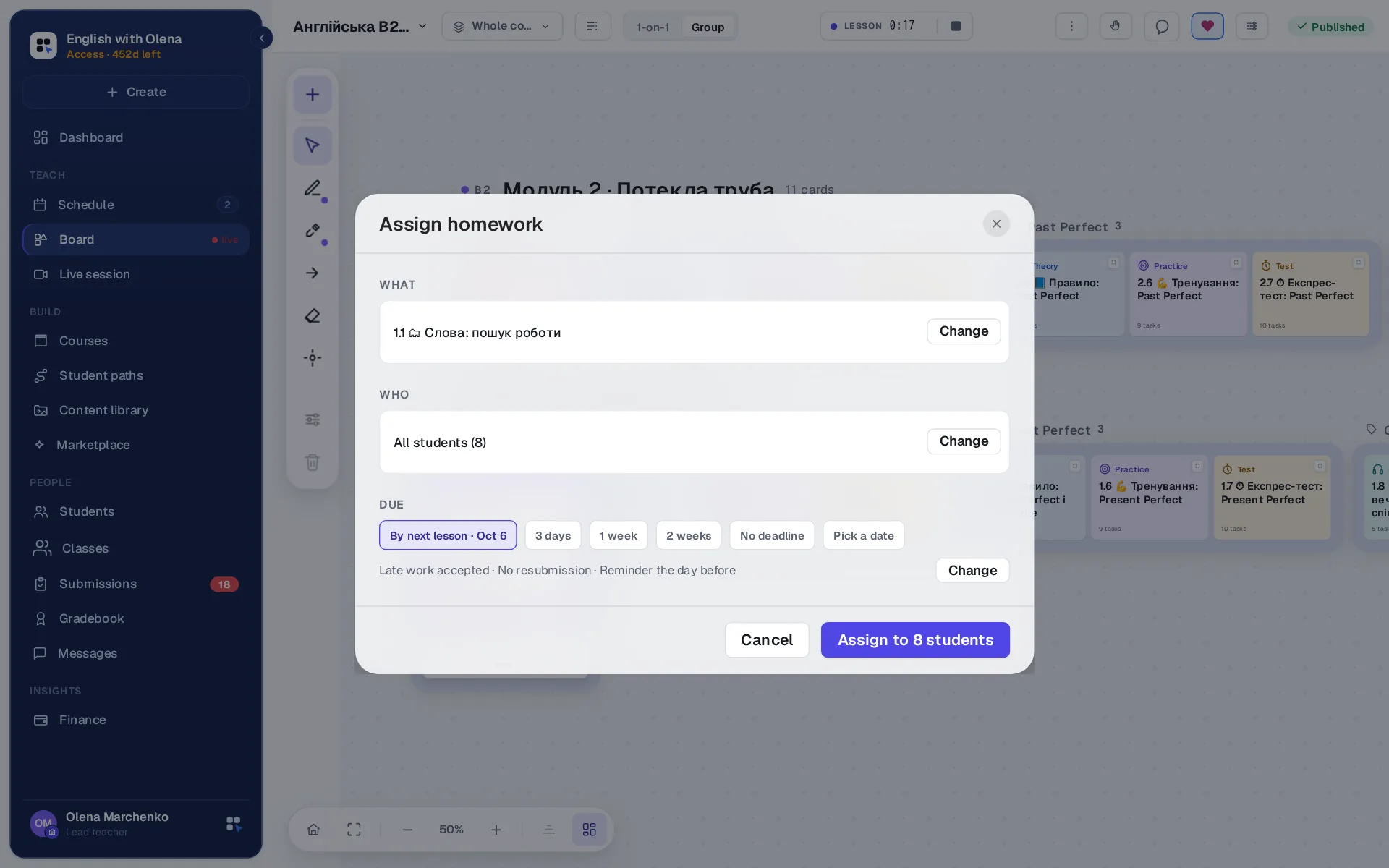
- By next lesson. When the student's next lesson is in your calendar, that is the deadline offered first. Or choose three days, a week, two weeks, a date of your own, or no deadline.
- The rules in the same window. A reminder the day before, a second attempt or one only, late work accepted or refused.
- Marked the moment it is handed in. Closed tasks are checked by the engine. The same answer gets the same result every time, with no charge per answer.
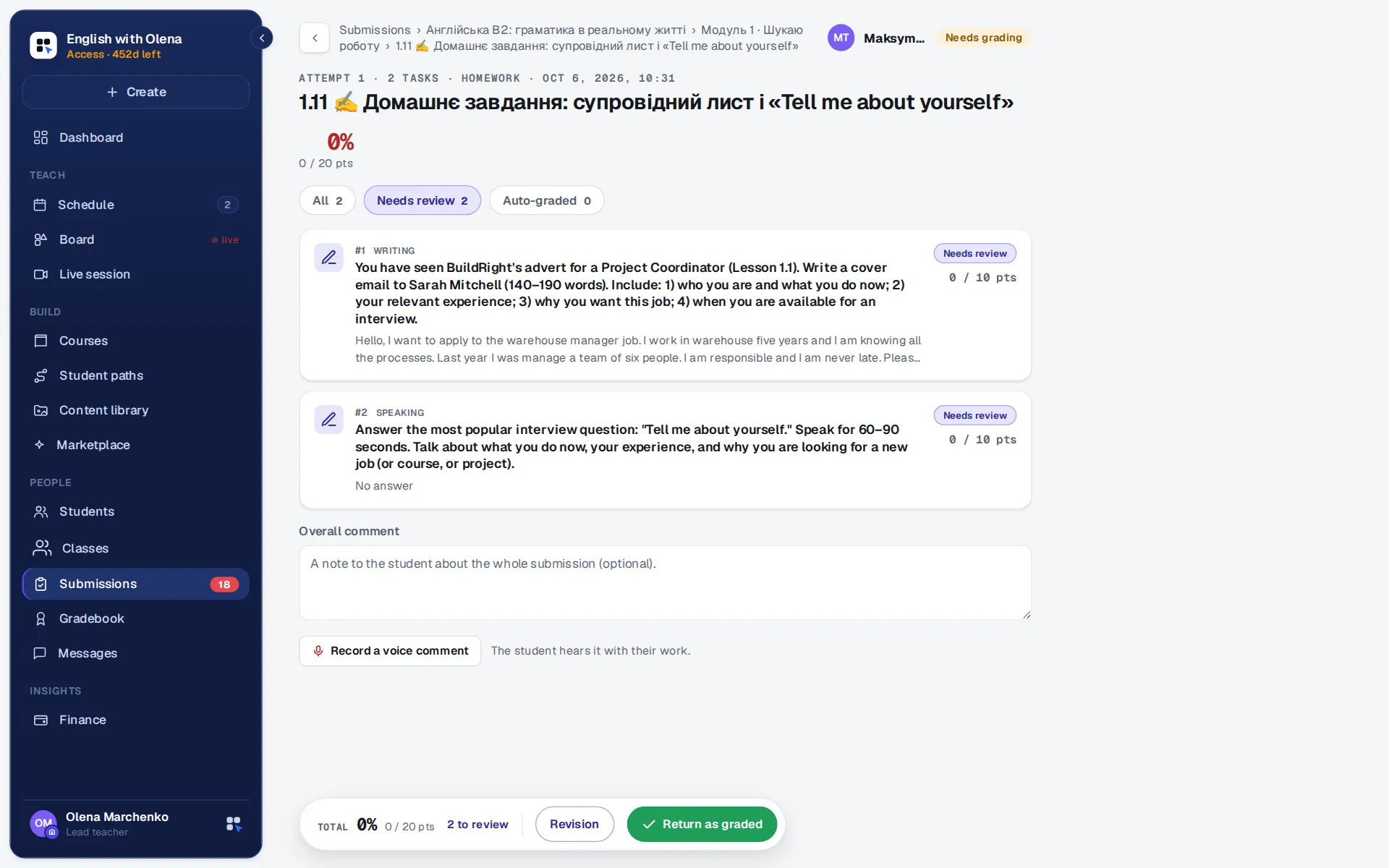
- One queue for what needs you. Writing and speaking wait in Submissions, student by student and answer by answer. Reply in writing or record a voice comment.
- Go over it in class. At the next lesson the board shows how many handed it in. Go over it with the class, or open one student's work and walk through it together.
Between lessons
What a student carries in their pocket.
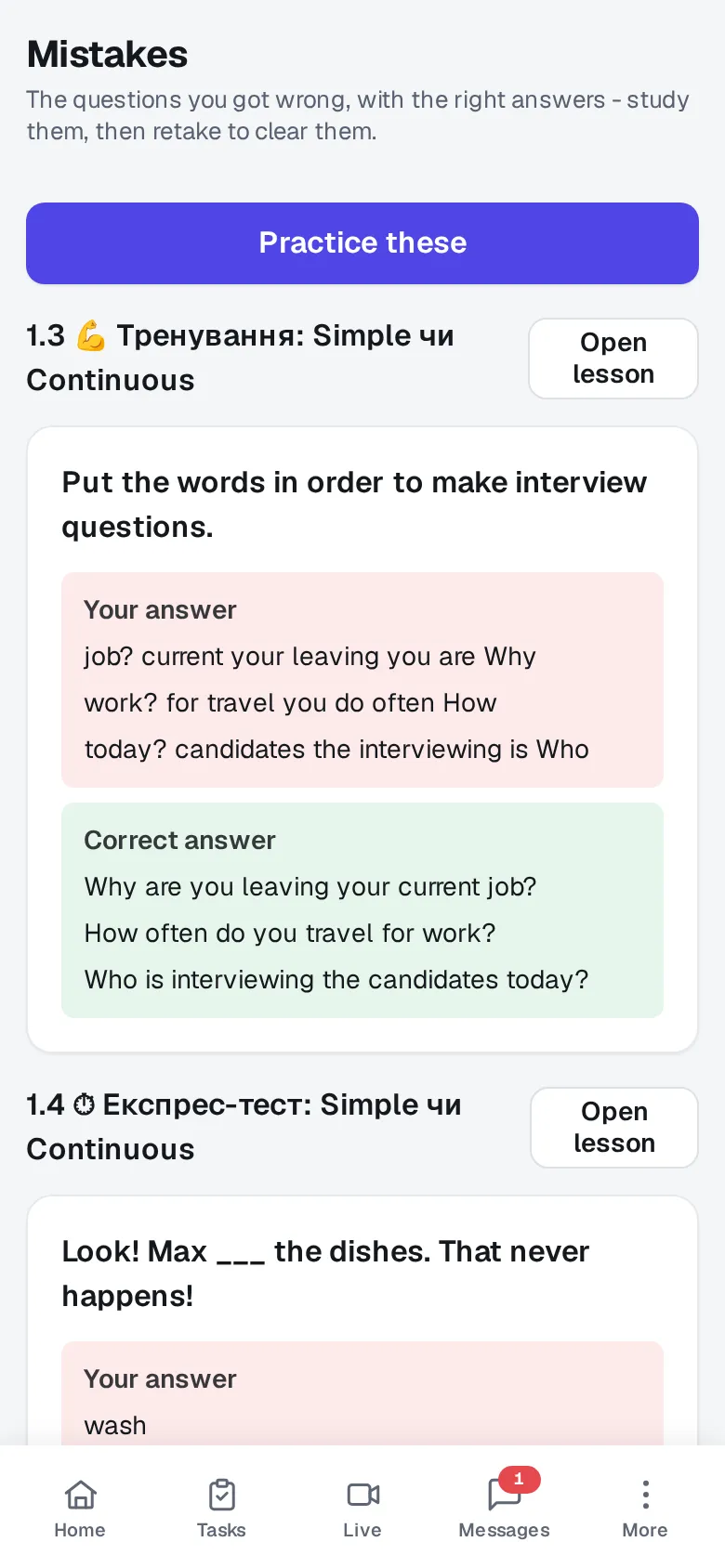
The student side is made for a phone. What is due comes first, and the words and mistakes from your lessons stay with them for the week.
- A vocabulary of their own. The words from your course gather in one place, with flashcards that come back on a spaced schedule.
- Every mistake, with the right answer. The questions they got wrong wait on one screen, and they can practise them until they stick.
- A question from inside the task. Ask your teacher sends you the question from the homework itself, so you know which task it is about.
- Pairs and small groups. Put students in a class once. Then start a lesson, set homework or write to all of them in one step.
- An app without a store. It opens in the browser and goes on the home screen of a phone like any other app.
Where the week goes
The hours nobody pays you for.
A tutor's income is hours times a rate, and the ceiling arrives quickly. What decides the year is not the rate. It is how many unpaid hours sit around every paid one.
Rebuilding materials
Every course starts from an empty page, and last year's tasks are in a folder you no longer trust.
Write a task once and reuse it in another course. Take a batch drafted by AI and edit it, or build it by hand in the constructor. Vocabulary decks feed flash tasks, board widgets and spaced repetition from the same words.
Marking closed tasks
The same evening, every week, on answers that have exactly one right result.
Closed task types are marked by the engine the moment the student answers. The same answer gets the same result every time, with no charge per answer and no waiting for a model.
Moving a lesson
Five messages to find a new time, and a calendar you then update by hand.
A student asks to move a lesson from their own schedule, and you accept or decline it in yours. Your lessons go into Google, Apple or Outlook Calendar in one tap, and a moved lesson moves there too.
Asking to be paid
The message you put off sending, then send twice, then stop sending.
Each student has an account you read one month at a time: what was charged, what arrived, what carries over and what is still owed. You see who is behind before the month ends, and a reminder is one tap from their row.
Your own front door
Your name on the door.
Your students should meet you first and the platform second. Your colour and logo go on the sign-in page and inside their panel, and a page of your own on our site tells a stranger who you are.
This picture is an illustration of the branded sign-in page. Each workspace sets its own colour, name and logo.
- A page of your own on our site. Your photo, the languages you teach and a few paragraphs in your own words. We read it before it goes live.
- Your colour and logo on the door, on the tab icon and inside the panels your students use.
- A sign-in address with your name. Your students open it and see your colours first. We set it up for you when you ask.
- A full site when you grow into a school. We build a school its own site on its own address and look after it. You can see one we made at valentina.edtechcore.com.
- One sign-in for everyone. You land in your panel and your students in theirs.
- Nothing to install. It runs in the browser and can be added to a phone's home screen as an app.
Money
You name the price. The account keeps itself.
Teaching for yourself means there is no administrator to hand the numbers to. So the numbers are part of the product: you set what a course costs, what a student pays, and the workspace keeps the running account underneath.
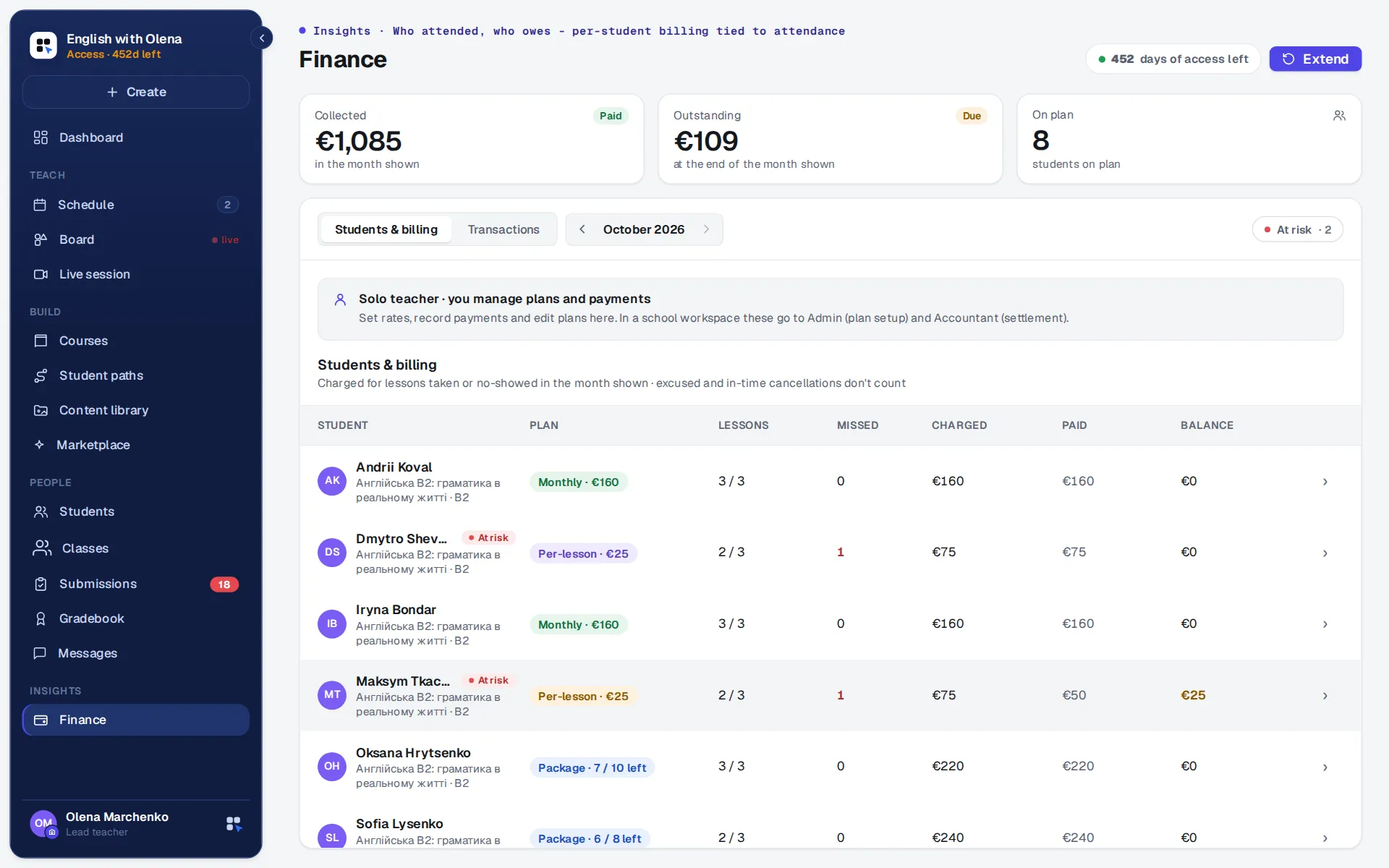
- One currency for your workspace. Course prices, student plans and every figure you read are in it, and a price in another currency is refused.
- A month is a running account. What was not paid in September carries over into October and stays on the books.
- Charged by who came. Mark the lesson in your schedule and the month follows: per-lesson students pay for what they took, and a package counts down by itself.
- You decide who keeps access. Archive a student who has stopped, and their sign-in closes while everything they did stays. Bringing them back takes one click.
- The payment rail is your own bank. Card, open-banking transfer or QR payment: we connect the provider you already have, so the money goes to your account and never passes through us. What lands here is the record: charged, paid, brought forward.
Your students are children? Their parents get a page of their own, with the lessons, the homework, your notes and what is paid, and a letter about the week every Sunday.
Where AI stops
AI drafts. It never grades.
It writes the first draft
Ask for a batch of tasks on a topic and level, then edit what comes back. It spares you the blank page; the teaching stays yours.
Three ways to draft
On the platform, within a daily number of drafts for each teacher; on your own API key; or in any AI chat you already use - copy the brief, paste the reply.
It does not mark work
Closed types are marked by a deterministic engine - the same answer, the same result, every time. Open answers are marked by you.
Students keep their answers
Students never see each other's answers. A student gets the right answer only after handing in, and only if you allow it.
Said plainly
What you can count on.
Your students stay yours
We do not list you in a catalogue or rank you next to other tutors.
Keep the call you use
Zoom, Meet or anything else: the lesson carries the link, and the board does the rest.
One system, one price
The board, the tasks, the homework and the accounts come together, for one price per workspace.
A person answers
When you write to us, someone who builds the product writes back.
Before you ask
Questions tutors ask.
Do I still need Zoom or Google Meet?
For the video, yes - we do not host video calls. A lesson carries its meeting link, so the call and the board open together. Everything else the lesson needs is here.
Will my students manage on their own?
Nothing to install: it opens in a browser, and the student side can sit on a phone's home screen like an app. The first thing a student sees is what is due, so the questions they bring you are about the language.
Can I move my existing materials in?
You rebuild them as tasks, and once a task exists you can reuse it in any course. While we set up your workspace, ask us what your material looks like in the constructor; that is the fastest way to find out.
Who marks the work?
Closed task types are marked by the engine, instantly. Writing, speaking and anything open is marked by you, in a view that shows the student's answer task by task, and you can leave your comment as a voice note.
How do my students pay me?
Through your own bank or payment provider. We connect the rail you already use: card, open banking or a QR transfer. The money reaches your account directly, and the payment settles that student's month here. We set it up together with you, and a payment recorded by hand works the same way if you prefer to keep it simple.
Do my students see the platform's name?
Your name, colour and logo come first, on the sign-in page and in their panel. Our name stays small, underneath yours.
What will it cost me?
One price for your workspace, monthly or yearly, with 30 days free first. Your students and courses are never counted. The pricing page has the numbers.
How do I get an account?
Press “Try it free”, leave your name and email and choose a password: you are in your own workspace at once, and the login details come by email too. 30 days free, no card. You invite your students with a link or a short code.
Free trial
Open your own workspace.
30 days free, no card. You go straight into your workspace, and the login details come by email; if you like, we set it up with you on your own materials and prices.
One step left: open the letter
We have sent the link to . Open the letter from EdTechCore: it opens your workspace, or offers to sign in if the address already has an account. It usually arrives within a minute; if it is not in your inbox, look in Promotions and Spam. If you asked more than once today, any of the letters will do: the link is the same.
This is a workspace of your own, to try everything as a teacher would. We set up the school together with you.
Asked again. Every letter carries the same link as the first; one address gets only a few letters a day.
Could not send the request. Please try again.
Another address?