Online whiteboard for lessons The task, on every student's screen.
Open a task and it opens for every student. You see who has answered, and you show the answer when the class is ready.
30 days free, no card.
In the lesson
You set the pace, the class follows.
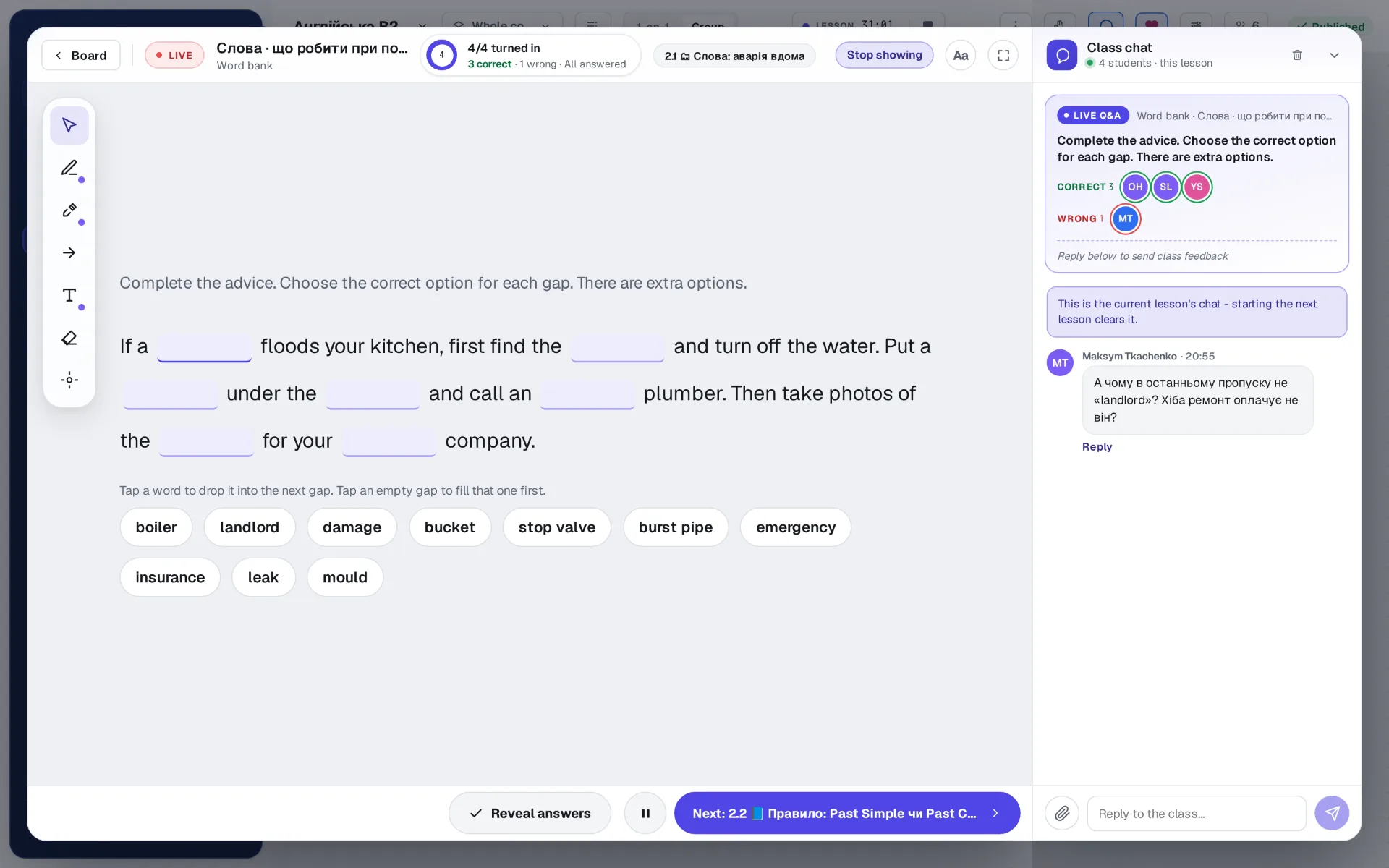
One task on every screen
The task you open is the one your students see, on a laptop or a phone. When you move on, they move with you.
The answer when the class is ready
Each student answers on their own screen. You see who has handed it in and how many are right, then show the answer to everyone at once.
Questions in the class chat
A student asks about the task in front of them without stopping the lesson. The question arrives in the class chat with the task attached.
A note for the class
Write a rule or a hint over the task, put in a picture or a PDF and draw on it. Every student sees it on their own screen as you write.
Answers stay private
No student sees a classmate's answer. Who answered what is for your eyes only.
A group or one student
The same lesson runs with a group or one to one. With one student you see their own answer as they give it.
The student's side
A student on a phone is in the same lesson.
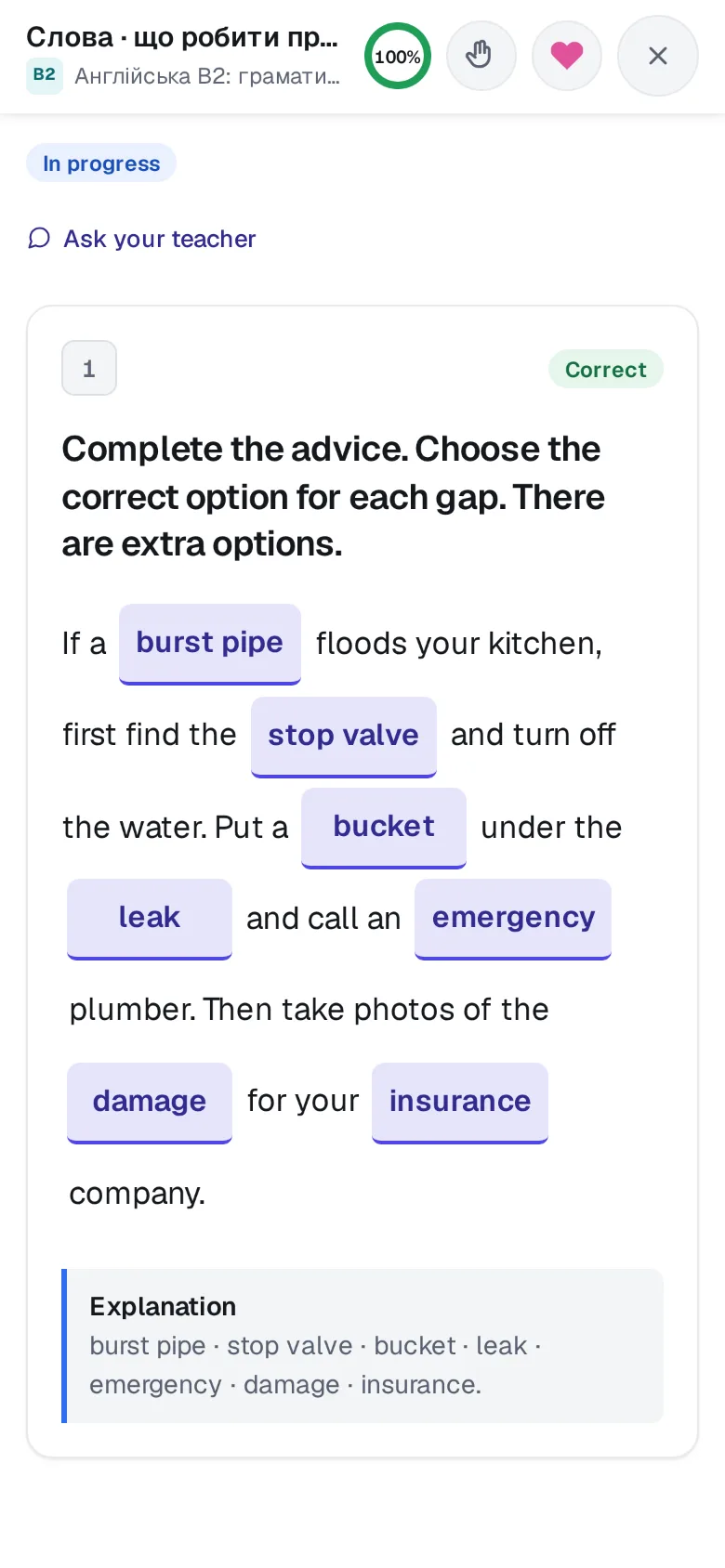
- Nothing to install. The board opens in the browser on a laptop, a tablet or a phone, and goes on a phone's home screen like an app.
- Made for the screen in hand. The task fills a phone's width, and the words tap into their gaps.
- Their own result, at once. A closed task is marked as it is handed in, with the explanation under it.
Tasks
Every kind of task, and who marks it.
From multiple choice and a word bank to listening, dictation and a walk across a city. Closed tasks are marked by the engine, the same answer the same way every time; writing and speaking wait for you. Every task type, in the tour.
After the lesson
Homework from the board, marked as it comes in.
Pick the tasks on the board and give them as homework, with the next lesson offered as the deadline. Closed tasks come back marked the moment they are handed in, and only the writing and speaking wait in your queue.
Who it is for
Tutors and language schools.
A tutor teaching their own students, or a school with its teachers and groups. The board is the canvas of a course, so its lessons, its homework and its students live in one place. After the free trial a plan is paid for: see the prices.
A ready English course at B1 is already waiting in a new workspace: what is in it.
Questions about the board.
Do students need to install anything?
No. The board opens in the browser on a laptop, a tablet or a phone. On a phone it can go on the home screen like an app.
Do students see each other's answers?
No. Each student answers on their own screen, and who answered what is for your eyes only. The class sees the answer when you show it.
What stays after the lesson?
The tasks, the students' answers and the homework stay in the course. What you draw over a task lasts for the lesson only, and a note for the class can be kept on the board as a card.
Can I teach on my own materials?
Yes. The board holds your own courses and tasks, with your pictures, audio and files. A ready English course at B1, written in Ukrainian, is already waiting in a new workspace, and it is yours to change.
Free trial
Teach your next lesson on it.
30 days free, no card. You go straight into your workspace, with a course already in it; the login details come by email too.
One step left: open the letter
We have sent the link to . Open the letter from EdTechCore: it opens your workspace, or offers to sign in if the address already has an account. It usually arrives within a minute; if it is not in your inbox, look in Promotions and Spam. If you asked more than once today, any of the letters will do: the link is the same.
This is a workspace of your own, to try everything as a teacher would. We set up the school together with you.
Asked again. Every letter carries the same link as the first; one address gets only a few letters a day.
Could not send the request. Please try again.
Another address?