For parents
Parents see how their child is doing, without calls and messages.
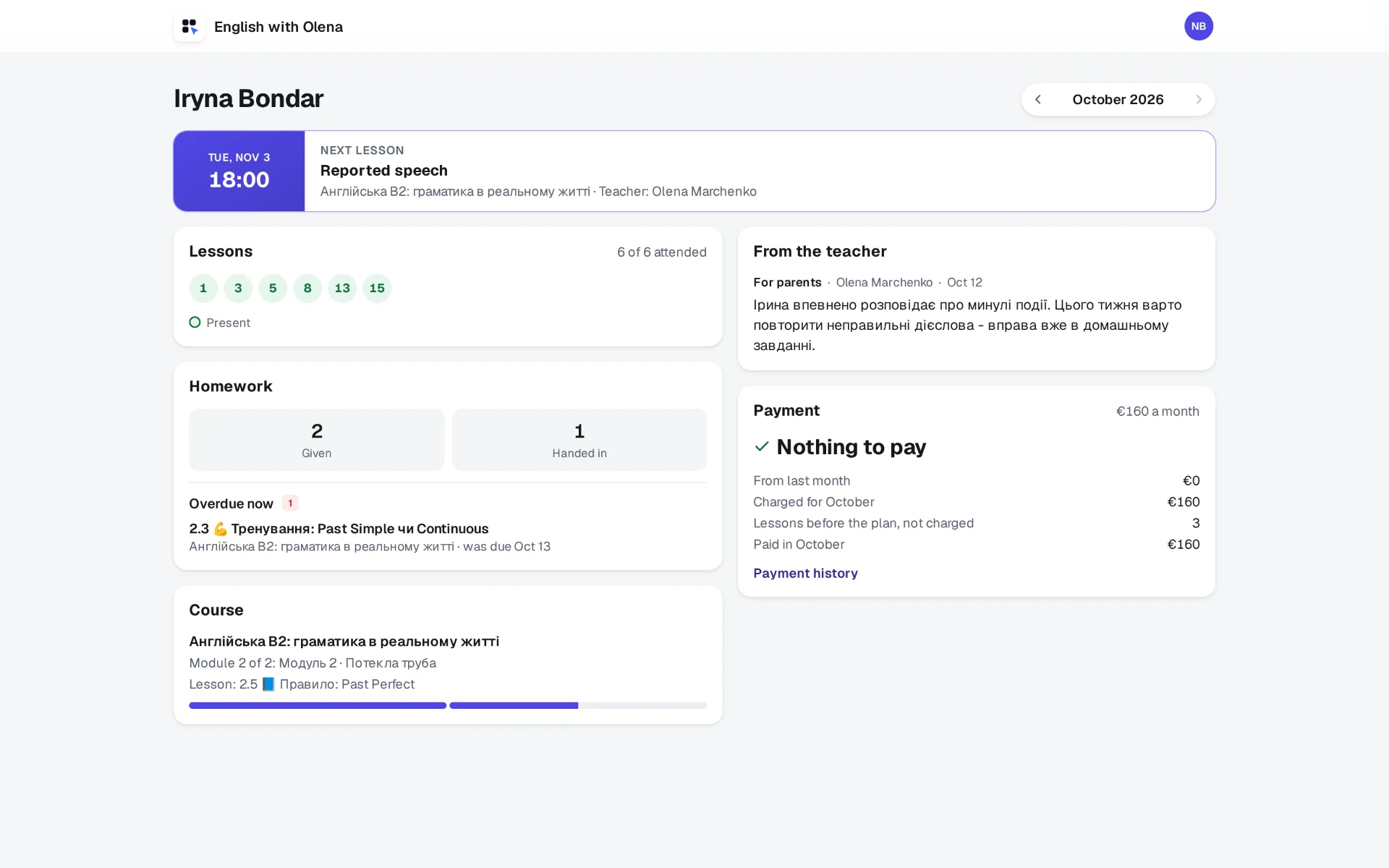
Every family gets a page of its own: lessons and attendance, homework, your notes for them, the next lesson and what is paid. On Sunday evening a letter sums up the week, and you do not write it.
30 days free, no card.
The questions that used to be yours.
How is she doing? Did he come on Thursday? Is the homework done? What do we owe? Each one is a message in the evening and an answer typed from memory. On the family's page the answers are already there, kept by the lessons you teach and mark anyway.
What a parent sees.
Lessons and attendance
Every lesson of the month with its mark: present, late, absent or excused, and the missed ones by date. When attendance slips, the page says so.
Homework
How much was set and handed in this month, the average score of what was marked, and what is overdue right now, by name.
Your notes for the family
What you write for the parents, and your progress reports. Notes for colleagues stay yours.
The next lesson
The day, the time, the course and who teaches it.
What is paid
When the student has a plan: what is due or in credit, what came over from last month, and the history of the payments you recorded.
Where in the course
The module and the lesson the child has reached.
The letter you do not write.
Every Sunday from six in the evening, on your school's clock, each parent gets the week: the lessons attended and missed, the homework handed in and overdue, your newest note and what is due. One letter per family, written for nobody else. A parent can turn it off in their own menu.
Who it is for.
A tutor whose students are children
The parents ask because they pay. Give them the page, and the questions come to it instead of to your phone.
For tutorsA language school
Every teacher's lessons and marks reach the same page, so a family sees one school, not five people.
For schoolsFor parents: how you get in.
Your child's teacher or school sends you an invitation, by email or as a link. Open it, choose a password, and you see your child's page; with more than one child at the school, each has their own. You see lessons, homework and results, the place in the course, the notes written for you and the payments. You do not see the answers, the conversations, the teachers' own notes or other students.
Give the parents their page this week.
30 days free, no card. You go straight into your workspace, with a course already in it; the login details come by email too.
One step left: open the letter
We have sent the link to . Open the letter from EdTechCore: it opens your workspace, or offers to sign in if the address already has an account. It usually arrives within a minute; if it is not in your inbox, look in Promotions and Spam. If you asked more than once today, any of the letters will do: the link is the same.
This is a workspace of your own, to try everything as a teacher would. We set up the school together with you.
Asked again. Every letter carries the same link as the first; one address gets only a few letters a day.
Could not send the request. Please try again.
Another address?