
Skip to content

Online platform for tutors and language schools How many hours a week do you work for free?

Nobody pays you for marking homework or preparing lessons. EdTechCore marks closed tasks the moment a student answers, so only writing and speaking reach you. The hour it frees becomes a lesson you already have a student waiting for, or simply your evening back.

30 days free, no card. We are launching by invitation, so we open your workspace and set it up with you.

Denys, project manager. Reads every request and answers it personally.

Count yours

example figures, put in yours
a week, at home or in the lesson
tests, gaps, matching, word order

8.7 hr a month spent marking homework

5.2 hr of it the platform marks for you

That is about €130 of your time every month.

The Tutor plan costs €30 a month

An estimate: a month is a twelfth of a year of 52 weeks, the share of closed tasks is your own guess, and lesson preparation is not counted at all.

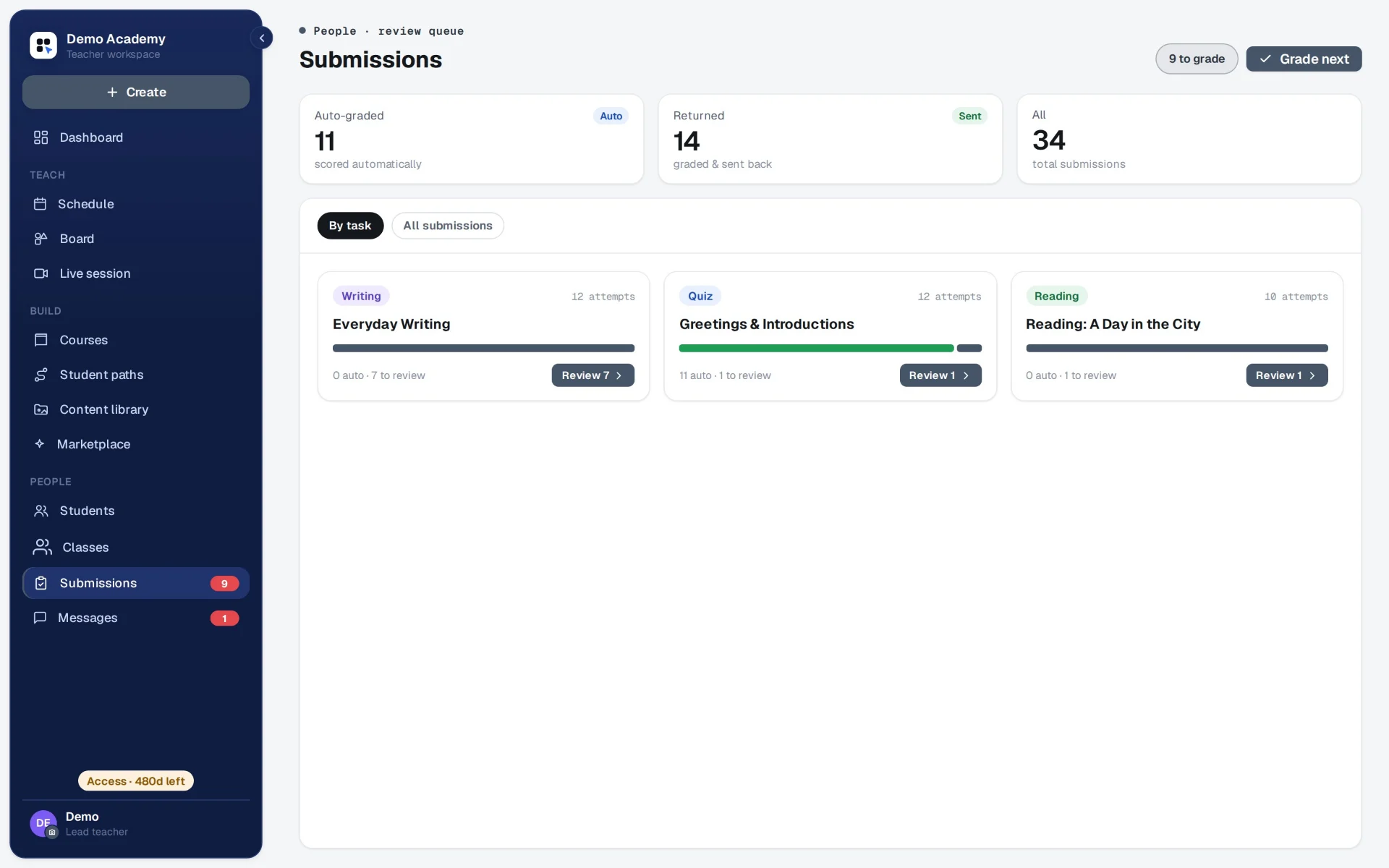
The teacher's Submissions screen: 11 auto-graded, 14 returned, 34 in all; the quiz has marked itself and the writing waits for review.
The marking queue in a demo course. The quiz marked itself: 11 pieces of work. The writing waits for the teacher: 7. Every picture on this page is a screenshot of the product as it stands today.

The work around the lesson

Nobody pays you for this. Now the platform does it.

every week

Marking homework

Tests, gaps, matching and word order are marked by the engine the moment a student answers. The same answer gets the same result, with no charge per answer. Writing and speaking wait in one queue, and your comment can be a voice note.

How homework works
before every lesson

Each student's mistakes

Before the lesson you see what each student gets wrong, their answer beside the right one. You change the approach on evidence, and the lesson starts where this student needs it. Between lessons they practise their own mistakes, and their grades stay as they were.

if you teach children

Reporting to parents

With children, the parents pay, and the parents ask how it is going. Now they have a page of their own: lessons and attendance, homework and results, and your notes for them. Every Sunday evening a letter sums up the week, so there is no writing to each family by hand.

with every new student

Preparation

A lesson you build once works for every student after, and tasks from your library carry over into another course. Need a fresh set on a topic and level? AI drafts it on your own key, and you edit it.

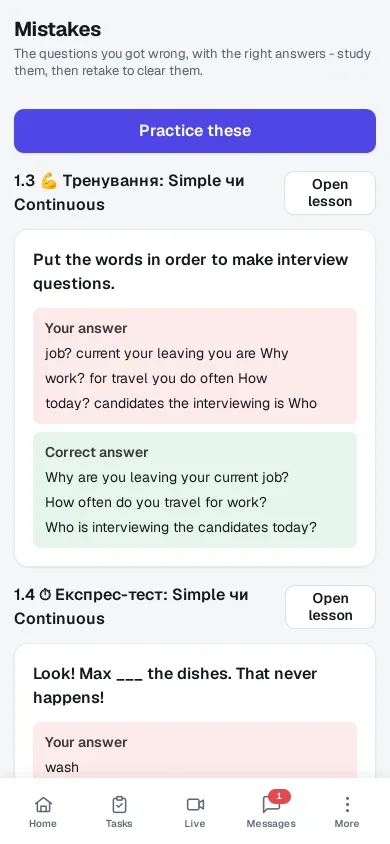
A student's Mistakes screen on a phone: a word-order question they got wrong, their answer marked in red, the right one in green, and a button to practise these.
The student's Mistakes screen. Their answer beside the right one, and a practice round that leaves their grades alone.

What it gives a tutor working alone

Try it

This is a task as a student sees it. Answer it.

The answer is marked the same second. The same happens to your students' homework while you get on with your evening.

Take the free English level test: about five minutes, no sign-up

Task · Present Continuous

Look! Max ___ the dishes. That never happens!

In the lesson

The class follows your screen.

Open a task and it opens for every student. You set the pace, see who has it right and show the answer when the class is ready.

  • One task on every screen

    The task you open is the one your students see, on a laptop or a phone. When you move on, they move with you.

  • Answers when you say

    Each student answers on their own screen. You see who got it right, then open the key for everyone at once.

  • Answers stay private

    No student sees a classmate's answer. Who answered what is for your eyes only.

Walk through a lesson
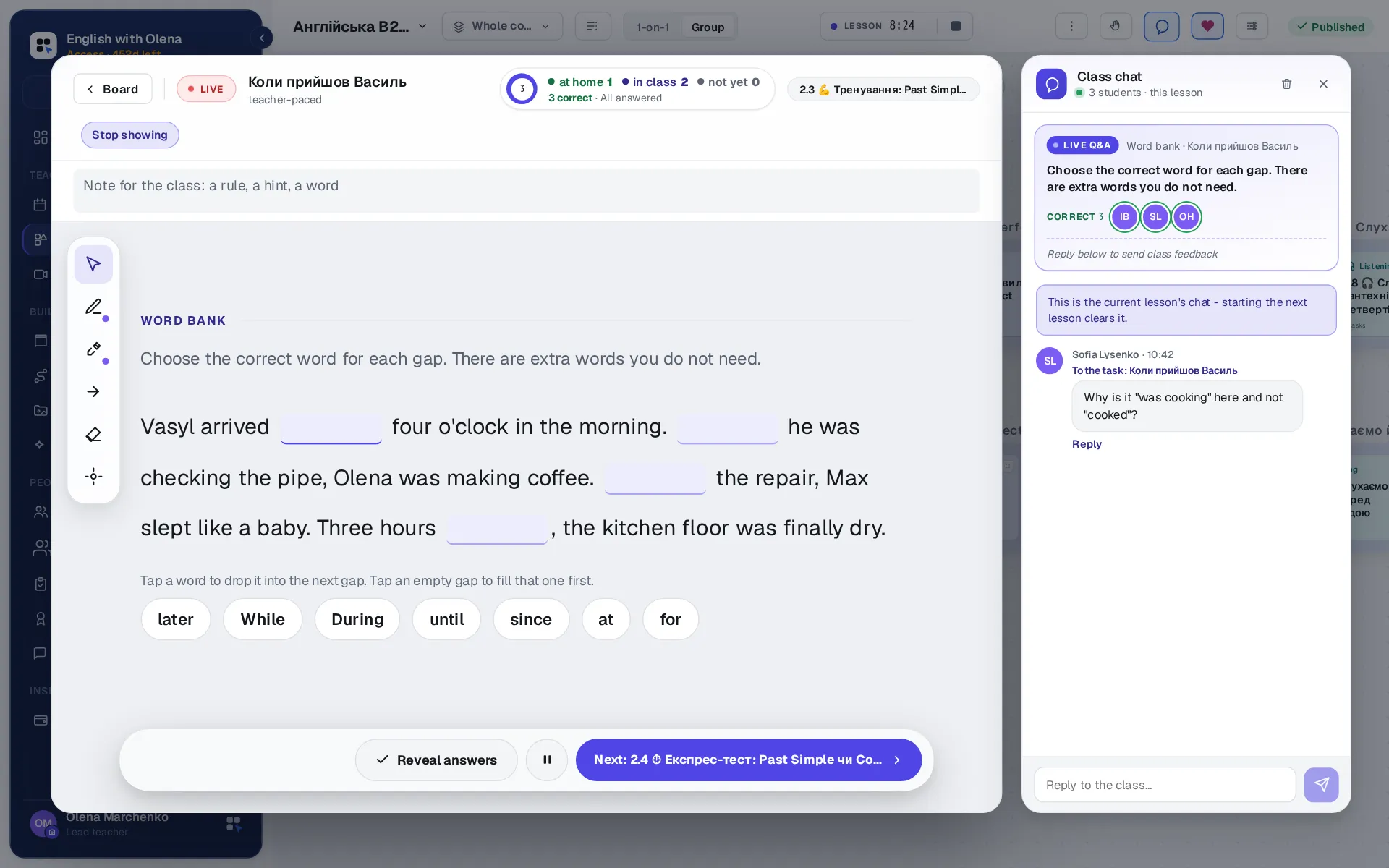
The teacher's lesson player with a word-bank task open for the class, a counter of who has answered, and the class chat beside it with a student's question about the task.
A lesson in progress. The task is open on every student's screen, three have answered, and a question about it has come in through the class chat.

Said plainly

No small print.

Who works with us

Schools and teachers who run on EdTechCore.

Each of them teaches on this platform and publishes their own site on it. If you are looking for a teacher, start here.

Price

One price a month. As many students as you like.

Tutor One teacher's own workspace

€30 a month

or €300 a year

  • Unlimited students
  • 30 days free, no card
  • Paid by invoice, nothing renews by itself
  • Stop paying and everything you built stays readable

Per workspace; where tax applies, the invoice says so.

Before you ask

What tutors ask first.

All the practical questions

I manage fine with Zoom, Google Docs and a messenger.

Most tutors do, and it costs nothing. The difference is your evenings: in a document you mark every answer yourself, and here the closed tasks are marked before the student closes the tab. Count your hours at the top of this page and compare them with the price.

I already have students. Why would I need a site?

You don't need one. The platform is for the work around the lesson, and you find students the way you do now. A page of your own is there if you ever want it.

How many students can I teach?

As many as you like. The price follows the number of teachers, and students are never counted.

What does a student have to install?

Nothing. Everything runs in the browser, and the student and teacher panels can be added to a phone's home screen as apps if you want them there.

How do teachers and students get an account?

By invitation. A school invites its teachers, a teacher invites their students, and a student can pass a short friend code on. While we launch, EdTechCore is invitation-only: try it free and we will set you up.

Which countries is EdTechCore for?

Ukraine and Poland - those are the countries this site is published for, and Ukrainian, Polish and English are the languages the panels and the platform's emails are published in. The product itself is not tied to a place: a lesson is online, so a teacher and a student in two different countries open the same board.

Who is behind EdTechCore?

An independent project, not yet a company. Its project manager is Denys, and every request and question gets a personal answer. It stays by invitation so that every school is set up by hand, and the price list shows what it costs after the free trial. The privacy notice says who is responsible for your data and where to write.

Contact

Try it free.

30 days free, no card: long enough to find out whether it fits your school or your own teaching. Leave your details and we will open your workspace and set it up with you on your own materials.

Who is asking?

Articles

Writing for people who run lessons.

Short, practical pieces on teaching online and running a school around it. New ones are added here.

All articles